

Context Caching in Google Gemini: Better Than RAG for Memory Management?

Did you know context caching Google Gemini can make token processing 4x cheaper compared to traditional methods?
Context caching isn’t magic. It’s a smart way to reuse previously computed tokens across multiple requests, cutting the need to reprocess the same information each time. This approach shines brightest with chatbots using extensive system instructions, repeated analysis of video files, and recurring questions about large document sets. Yet the 32k token minimum requirement raises practical questions for smaller applications.
At $1 per million tokens per hour, context caching represents a significant investment compared to alternatives like retrieval augmented generation (RAG). For high-volume operations, though, the math changes dramatically – you’ll see faster response times and reduced computational demand. The consistency bonus also matters – cached contexts produce more coherent responses across multiple interactions.
We’ll explore how context caching actually works in Gemini, examine the real cost implications, and help you decide if this approach truly offers a better alternative to RAG for memory management in large language models. Smart token management isn’t just about saving money – it’s about creating systems that deliver consistent, reliable responses at scale.
How Context Caching Works in Gemini API
“Using the Gemini API context caching feature, you can pass some content to the model once, cache the input tokens, and then refer to the cached tokens for subsequent requests.”
— Google AI Team, Official Google AI Development Team
Context caching in Google Gemini follows a three-step process: creation, reference, and management. Unlike traditional token processing, this approach lets you store frequently used content once and reference it across multiple API calls – saving both time and money.
Creating a Context Cache with Vertex AI
We start by creating a cached content resource through the Vertex AI API. This first step requires sending a POST request to the publisher model endpoint with specific parameters:
POST https://LOCATION-aiplatform.googleapis.com/v1/projects/PROJECT_ID/locations/LOCATION/cachedContents
Your request body must include the model name, display name, and contents to cache:
{
  "model": "projects/PROJECT_ID/locations/LOCATION/publishers/google/models/gemini-2.0-flash-001",
  "displayName": "CACHE_DISPLAY_NAME",
  "contents": [{
    "role": "user",
    "parts": [{
      "fileData": {
        "mimeType": "MIME_TYPE",
        "fileUri": "CONTENT_TO_CACHE_URI"
      }
    }]
  }]
}
Once created, the API returns a response with a unique resource name identifying your cached content. This resource includes important metadata such as creation time, update time, and expiration time.
Referencing Cache via Resource Name
After successfully creating your cache, you can reference it in subsequent requests using its resource name. Find this name in the response from the creation command:
projects/PROJECT_NUMBER/locations/LOCATION/cachedContents/CACHE_ID
To use a cached context in your requests, simply include the cachedContent parameter in your API call:
{
  "cachedContent": "projects/PROJECT_NUMBER/locations/LOCATION/cachedContents/CACHE_ID",
  "contents": [
    {"role":"user","parts":[{"text":"Your prompt here"}]}
  ]
}
Remember that certain features can’t be specified again once they’re set during cache creation. These include system instructions, tool configurations, and tools.
Updating and Deleting Cached Contexts
Each cached content expires after 60 minutes by default. You can modify this using two methods:
- TTL (Time To Live) – Specifies how long the cache should live after creation or TTL update:
PATCH https://LOCATION-aiplatform.googleapis.com/v1/projects/PROJECT_ID/locations/LOCATION/cachedContents/CACHE_ID
With a JSON body containing:
{
  "ttl": {"seconds":"3600","nanos":"0"}
}
- Absolute Expiration Time – Sets a specific timestamp for cache expiration:
{
  "expire_time":"2024-06-30T09:00:00.000000Z"
}
If a cached context is no longer needed, you can delete it before expiration using a DELETE request:
DELETE https://LOCATION-aiplatform.googleapis.com/v1/projects/PROJECT_ID/locations/LOCATION/cachedContents/CACHE_ID
An expired context cache is automatically deleted during garbage collection and can’t be used or updated afterward. If you need the content again, you’ll need to recreate the cache.
The Gemini API treats cached tokens just like regular input tokens. The cached content serves as a prefix to your prompt, allowing for seamless integration with your existing workflow while cutting token usage and reducing computational overhead.
Token Management and Technical Constraints
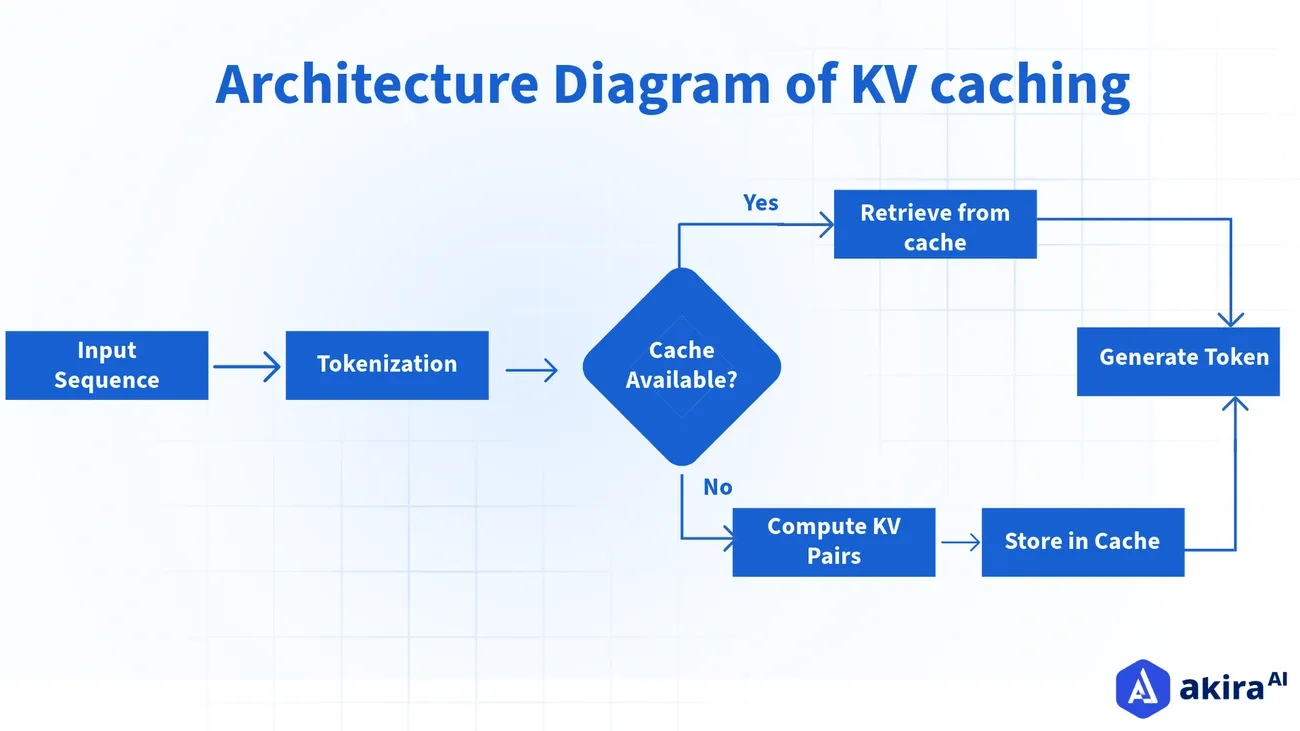
Image Source: Akira AI
Success with context caching starts with understanding the technical boundaries that shape your implementation. These aren’t arbitrary limits – they’re practical guardrails that determine how much data you can store, how long you can access it, and what it will cost you.
Minimum Token Threshold: 4096 Tokens
Context caching in Gemini requires a minimum threshold to be effective. According to Google’s documentation, the minimum size of a context cache is 4,096 tokens. This marks a welcome reduction from earlier versions that demanded at least 32,768 tokens.
Why this threshold? Simple economics. Smaller contexts process quickly anyway, making caching unnecessary. Larger contexts, however, see substantial performance gains when cached. If your application uses fewer than 4,096 tokens, traditional processing likely makes more sense for your needs.
The cache works as a prefix to your prompt in each request – these tokens automatically precede any new input. This design maintains continuity across multiple interactions without wasting resources on reprocessing what hasn’t changed.
Token Limits per Model (Gemini 2.5 Pro, Flash)
Each Gemini variant comes with specific token boundaries that directly shape your caching strategy:
- Gemini 2.5 Pro: Handles a maximum input of 1,048,576 tokens with an output capacity of 65,536 tokens
- Gemini 1.5 Pro: Processes up to 2,097,152 tokens of input
- Gemini Flash variants: Maintain 1,048,576 token input capacity with 8,192 token output limits
These massive context windows represent a quantum leap from earlier models that struggled with just 8,000 tokens. Remember – these limits apply to the combined total of cached tokens plus new input in any request.
These expanded capacities eliminate many traditional workarounds we’ve all struggled with:
- No more dropping old messages from context windows
- No need to summarize previous content to save space
- Less reliance on vector databases via RAG systems
- Fewer filters to remove “unnecessary” text
TTL Configuration and Expiry Handling
Every cache comes with a built-in expiration clock. By default, cached content disappears after 60 minutes. This automatic cleanup prevents resource waste and unexpected billing surprises.
You control this timeframe through two methods:
- Setting a specific Time-To-Live (TTL) duration
- Defining an absolute expiration timestamp
The minimum TTL is just 1 minute, with no specified maximum. Once expiration hits, the cached content vanishes completely and must be recreated if needed again.
You can update an unexpired cache’s expiration time as needed, giving you flexibility when usage patterns shift. This feature proves particularly valuable for applications with unpredictable interaction frequencies.
Understanding these boundaries helps you make smart decisions about implementing context caching in your Gemini projects, balancing performance gains against the practical realities of token thresholds and expiration times.
Cost Optimization Strategies with Context Caching
“At certain volumes, using cached tokens is lower cost than passing in the same corpus of tokens repeatedly.”
— Google AI Team, Official Google AI Development Team
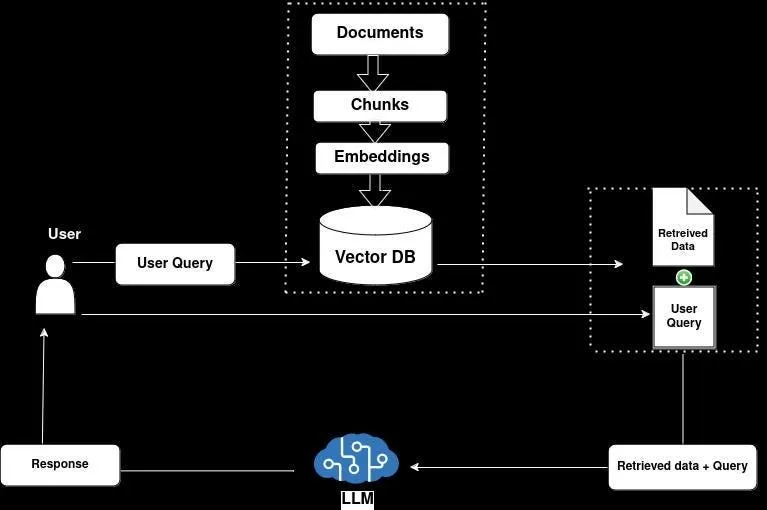
Image Source: Medium
Context caching isn’t just about technical efficiency – it’s a financial game-changer for teams running LLM-powered applications at scale. Smart implementation creates dramatic cost savings while maintaining high performance where it matters.
Reduced Rate for Cached Tokens
The math tells a compelling story. Cached tokens cost significantly less than standard processing – for Gemini 1.5 Flash, you’ll pay approximately 4x less than the standard input/output cost. This translates to real numbers:
- Gemini 1.5 Flash: USD 0.02 per million tokens (≤128k tokens) or USD 0.04 (>128k tokens)
- Gemini 2.0 Flash: USD 0.03 per million tokens for all content types
These savings multiply in scenarios where users repeatedly interact with the same data. Instead of paying full price each time tokens are processed, cached tokens run at these reduced rates. For high-volume applications, this difference isn’t just noticeable – it’s transformative.
Hourly Billing for Stored Tokens
Beyond processing, you’ll pay storage fees based on cache duration. Google bills cached tokens at USD 1.00 per million tokens per hour. The formula is straightforward:
Total Storage Cost = (Number of Cached Tokens / 1,000,000) × $1.00 × Hours Stored
Your TTL configuration directly impacts this cost since it determines how long tokens remain cached. While there are no minimum or maximum bounds on TTL, strategic TTL management becomes essential for balancing availability with expense.
Here’s what this means in practice: A knowledge base with 50,000 tokens accessed by 100 users making 15 queries daily costs approximately USD 38.00 per day with traditional processing. Context caching drops this to just USD 1.37—a 96% cost reduction.
Avoiding Provisioned Throughput Conflicts
We need to highlight an important limitation: context caching doesn’t play well with Provisioned Throughput. Any Provisioned Throughput requests attempting to use context caching automatically convert to pay-as-you-go.
Provisioned Throughput – designed for fixed-cost subscriptions that reserve model capacity – simply doesn’t mesh with caching mechanisms. This matters especially for applications with:
- Real-time production needs like chatbots and agents
- Critical workloads requiring consistent throughput
- Requirements for predictable AI costs
You’ll need to choose between these optimization approaches based on your specific requirements. For applications frequently accessing large context windows, context caching typically delivers superior economics, primarily through dramatic reductions in per-token processing costs.
Comparing Gemini Context Caching with RAG and Semantic Caching
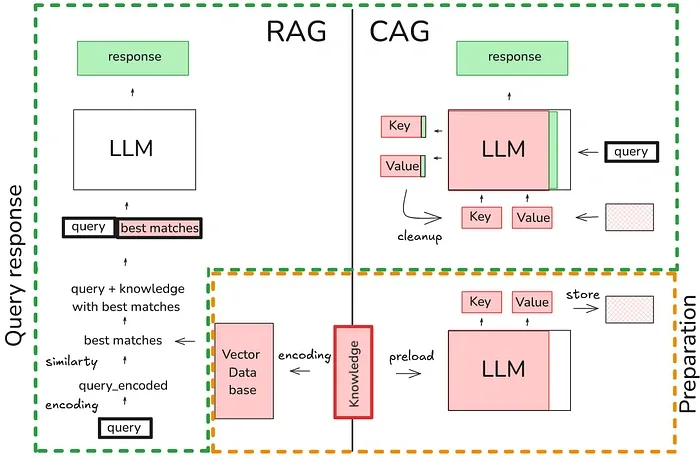
Image Source: Towards AI
When choosing the right memory management solution, you need to understand how different caching approaches stack up in real-world scenarios. Let’s break down what matters for your specific needs.
OpenAI vs Anthropic vs Gemini Context Caching
The big three AI providers approach context caching with notably different requirements and economics:
| Provider | Min Tokens | Default TTL | Cost Savings | Storage Cost |
|---|---|---|---|---|
| OpenAI | 1,024 | 5-10 min | 50% discount on inputs | Free |
| Anthropic | 1,024/2,048 | 5 min | 90% off inputs, 75% off outputs | Free |
| Gemini | 32,768 | 60 min | 75% discount on inputs | $1/million tokens/hour |
OpenAI’s approach works automatically for prompts exceeding 1,024 tokens – seamless but with the smallest discount. Anthropic demands explicit cache creation but rewards you with the highest savings at 90% off input costs. Gemini requires the largest minimum token threshold with customizable TTL settings, though you’ll pay storage fees for the privilege.
Semantic Caching with FAISS and OpenSearch
Semantic caching takes a completely different approach – instead of storing raw tokens, it works with vector embeddings of queries. The process:
- Your text queries become numerical vector embeddings
- These vectors live in specialized databases like FAISS or OpenSearch
- The system matches similar meanings, not just identical text
This approach eliminates up to 31% of redundant LLM calls, slashing response times from seconds to milliseconds. We’ve seen real-world document question-answering systems jump from 6,504ms to 1,919ms – 3.4x faster – with semantic caching.
Use Case Fit: RAG vs Context Caching vs Semantic Caching
Each approach shines in specific scenarios:
- RAG: Your best choice when you need fresh, grounded responses from external knowledge sources. Ideal for factual questions requiring current information.
- Context Caching: Perfect for repeatedly processing large, static contexts like videos, code repositories, or lengthy documents. Most cost-effective when the same context gets queried multiple times.
- Semantic Caching: The smart option for applications with high query volume where similar questions come up frequently. Customer service, knowledge bases, and QA systems benefit most.
Your decision ultimately comes down to your specific needs regarding information freshness, context size, and query patterns. We don’t just recommend technologies—we help you find the right fit for your unique requirements.
Limitations and Practical Challenges
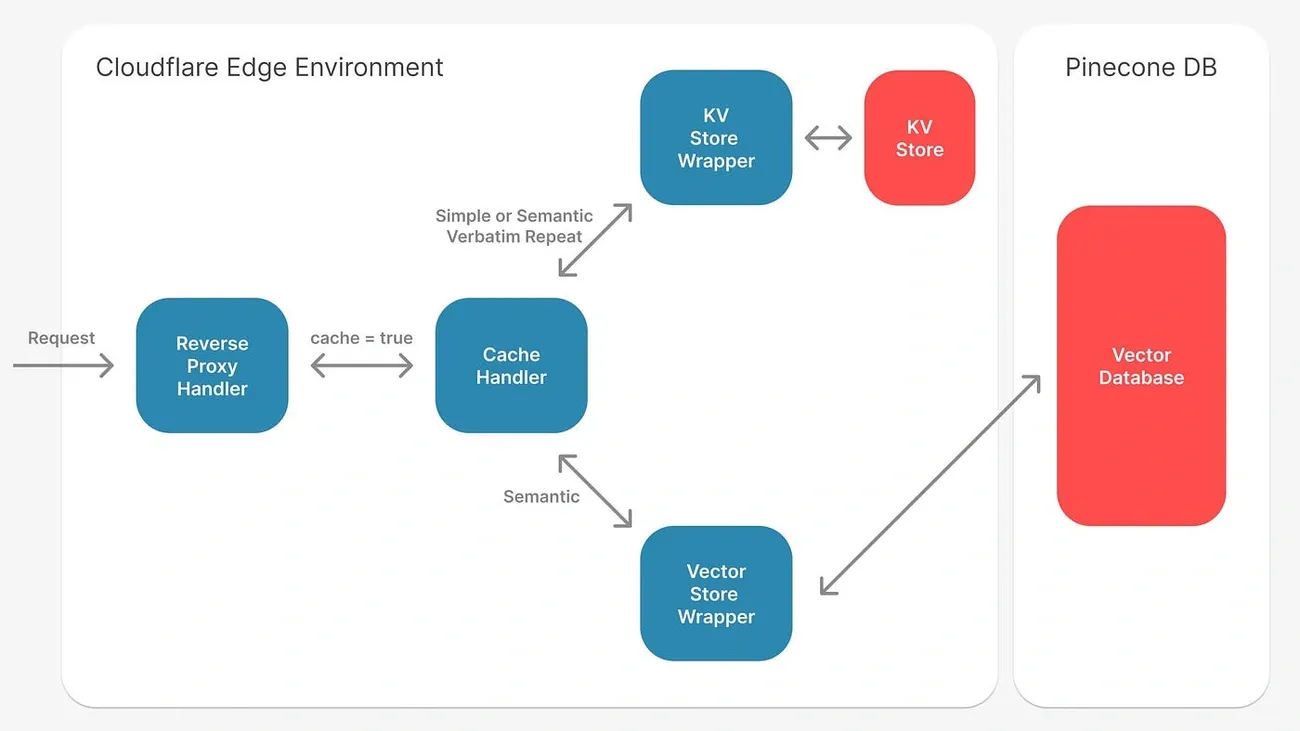
Image Source: Medium
Context caching looks great on paper. But real-world implementation comes with several practical hurdles you need to understand before jumping in.
32k Token Minimum Barrier for Small Use Cases
The minimum token requirement creates a significant roadblock for many projects. While Google’s documentation states a 4,096 token minimum, multiple sources indicate practical implementation requires at least 32,768 tokens. This confusion matters – the higher threshold effectively removes context caching as an option for smaller applications.
Teams with limited context sizes or single-query use cases face a simple math problem: storage costs quickly outweigh benefits when working with contexts below this threshold. Applications with low query volume will find standard approaches more cost-effective than maintaining cached contexts.
Latency Tradeoffs in Real-Time Applications
Here’s a common misconception: context caching primarily reduces costs, not response times. This distinction becomes crucial for real-time applications where performance can’t be compromised. The speed-accuracy balance gets especially tricky in time-sensitive scenarios like fraud detection or autonomous driving, where milliseconds matter.
Caching a large context still demands substantial processing time. Even with notebook overhead pushing wall time to 9 seconds, the actual model processing time remains significant. Applications needing near-instant responses may find traditional approaches more suitable than context caching.
Lack of Freshness in Cached Responses
The default 60-minute expiration time creates real problems for applications dealing with rapidly changing data. Once cached, content stays static until expiration, potentially serving outdated information as the underlying data evolves.
This staleness becomes particularly problematic in dynamic environments where information accuracy is critical. Context caching works best with static content that doesn’t frequently update – making it a poor fit for news feeds, real-time analytics, or financial applications requiring current data.
Beyond these core limitations, teams implementing context caching must factor in staff retraining costs, potential system overhauls, and the challenge of managing computational resources effectively across different deployment scenarios.
Conclusion
Context caching in Google Gemini represents a significant step forward for token processing efficiency, though it’s not right for every situation. We’ve seen how this approach cuts costs by 75% compared to standard methods while maintaining those valuable extended context windows across multiple interactions.
The ability to reuse previously computed tokens makes this approach particularly valuable for teams repeatedly analyzing large, static datasets. The 32,768 token minimum creates a clear dividing line – smaller applications hit a financial wall, while enterprises working with extensive document sets, code repositories, or video content will see substantial savings.
The math favors high-volume operations. At approximately $1 per million tokens per hour for storage plus reduced processing fees, organizations achieve real economies of scale. But this isn’t an either/or decision against RAG – each tool solves different problems. RAG delivers fresh, grounded responses from up-to-date sources. Semantic caching handles repetitive similar queries efficiently. Context caching excels when processing large, unchanging contexts repeatedly.
Your specific requirements should guide your choice. Do you need the latest information or consistent responses from static content? Are your contexts massive or modest? How often do you repeat similar queries? The token threshold, TTL configuration, and query patterns all point toward the right implementation path.
We don’t just see these as competing approaches. As LLM technologies evolve, we’ll likely see these methods merge into hybrid solutions that combine strengths from each approach. Context caching isn’t replacing RAG – it’s another valuable tool in your arsenal for optimizing large language model deployments at scale.
